Your personal information
Your personal information is collected through your application to Memorial. You can confirm and make changes to some of your personal information in Student Self-Service under the Personal Information menu.
Mailing address, phone numbers, emails
Check your personal information to ensure that your address, phone numbers and emails are active and valid. Update the information as necessary.
- Login to my.mun.ca and navigate to the Student Self-Service channel
- Click on Personal Information button
- Under the Personal Information menu, you will see various rows of information where you can view/edit:
- Personal details
- Email addresses
- Phone Numbers
- Addresses
- Emergency Contacts
- To update, you can click on the existing information and update the appropriate field. If an entry does not already exist, you will need to add it through the Add New button.
- If you add a new email address, you may need to verify it by clicking on Send Email Address Verification.
Adding a preferred name
You can add a preferred first name through my.mun.ca by clicking the Personal Information button within the Student Self-Service channel. Once on the Personal Imformation page, click the Edit and then add your Preferred First Name in the appropriate field.
If you want to add a preferred middle or last name, use the Change of Name form or email registrar@mun.ca. Once the change has been submitted, allow up to one week for the changes to be implemented. Student Life provides further details on their Trans & Gender Diverse Students' Guide.
Please note, your preferred name will not appear on official mail correspondence and your transcript. If you wish to change your name for these documents, you will need to submit a legal name change.
Not all Memorial technology systems implement a preferred name system. Reach out to the department hosting the system, or to Memorial IT Services if your preferred name change is not reflected.
Legal change of name
You can request a change of name by either the Change of Name form or email registrar@mun.ca. This change could be a legal name change or a correction to your name (e.g. adding your middle name). Documentation will be required for any legal name changes. Once the change has been submitted, allow up to one week for the changes to be implemented.
To make personal information changes or corrections not accessible through Student Self-Service, email registrar@mun.ca.
Adding/updating your SIN
Effective January 2019, all post-secondary institutions in Canada were required to collect students’ Social Insurance Numbers (SIN). This information is required for the T2202 tuition and enrolment certificates. SINs need to be collected prior to the February T2202 processing. For more information about this required change in process, visit the CRA website.
You only need to provide your SIN once. If you received a notice informing you that you need to enter your SIN, follow the steps below:
- Visit my.mun.ca and click the Student Hub button within the Student Self-Service channel.
- Once on the Student Hub page, click Enter Social Insurance Number (SIN) which is located in the left-hand menu.
- On the Social Insurance Number screen:
- If you see an empty SIN box (as seen in the image below), please enter your Social Insurance Number.
- If you see the last four digits of your SIN, your Social Insurance Number is already on record. You do not need to enter it again.
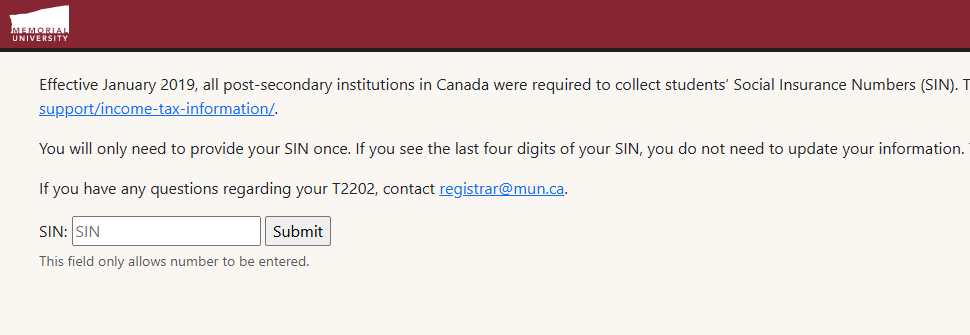
Verify the last four digits of the SIN, if it matches yours, no further action is required. If it does not match, or your SIN has changed, contact registrar@mun.ca to erase your old SIN from your account. You can then complete the steps above to add your current SIN to your account.
If you have any questions about updating your SIN, reach out to registrar@mun.ca.
Social Insurance Number (SIN) for international students
International students are eligible for a SIN if they hold a work permit or a study permit that authorizes them to work. A SIN is required to work in Canada. A SIN is not required to file a tax return. If you are not eligible for a SIN and you are considered a resident for tax purposes, you can still file a tax return by applying for an Individual Tax Number. The Internationalization Office can advise you on filing a tax return, applying for a SIN and working in Canada.
- Services for international students provided by the Internationalization Office
- SIN for temporary residents
- Determine if you are considered a resident for tax purposes
- Applying for an Individual Tax Number (ITN) if you can't apply for a SIN